Template Examples
This section provides practical examples of templates you can use and adapt for your organization.
- S3 Bucket
- EC2 Instance
Creating an AWS S3 Bucket Template
Follow this example to create a simple AWS S3 bucket. Venue.sh will take variables defined in your template steps and replace your template files with the actual values when used.
.
├── providers.tf
├── main.tf
├── variables.tf
├── docs
│   └── index.md
terraform {
  required_providers {
    aws = {
      source  = "hashicorp/aws"
      version = "~> 6.0"
    }
  }
}

provider "aws" {
  region = var.region

  default_tags {
    tags = {
      "BusinessUnit"  = "purplehotels-devops"
      "Department"    = "product-${{ values.environment }}"
      "Team"          = "purplehotels-devops"
      "Stage"         = "${{ values.environment }}"
      "Support:Email" = "support@purplehotels.com"
      "Support:Slack" = "purplehotels:support"
      "Support:Url"   = "https://purplehotels.atlassian.net/jira/servicedesk/projects/PH/queues/custom/4"
    }
  }
}
resource "aws_s3_bucket" "${{ values.bucket_name }}_s3_bucket" {
  bucket = "s3-${{ values.bucket_name }}"
}
variable "region" {
  type = string
  default = "${{ values.region }}"
}
# ${{ values.bucket_name }} (Terraform AWS S3)

## Values

- name: ${{ values.bucket_name }}
- region: ${{ values.region }}
- environment: ${{ values.environment }}
When creating a template, each ${{ values.variable }} that you define in your files must also be defined in the variables step.
In the following example, we split the variables into two steps. While you can define your variables however you desire, we recommend splitting them into multiple steps.
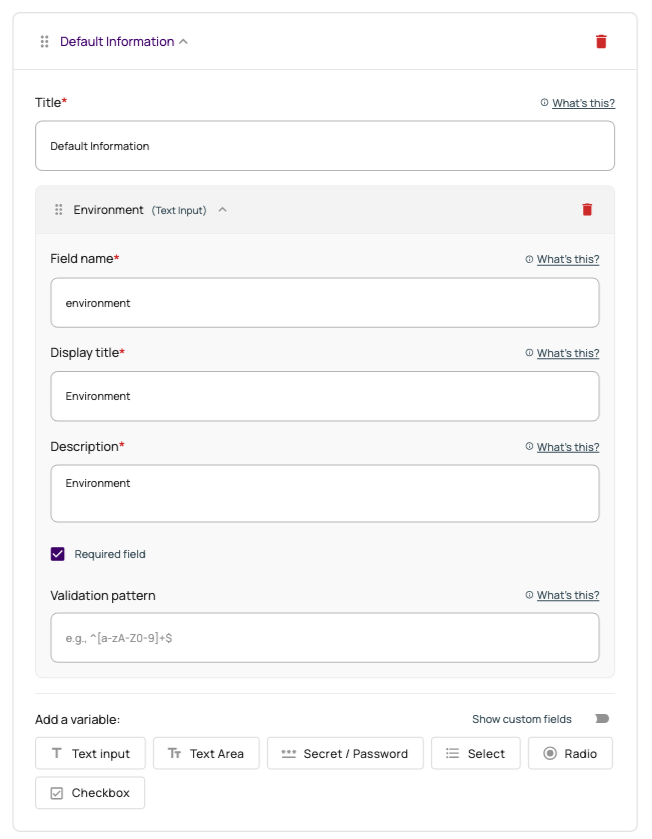
Step 1: Default Information
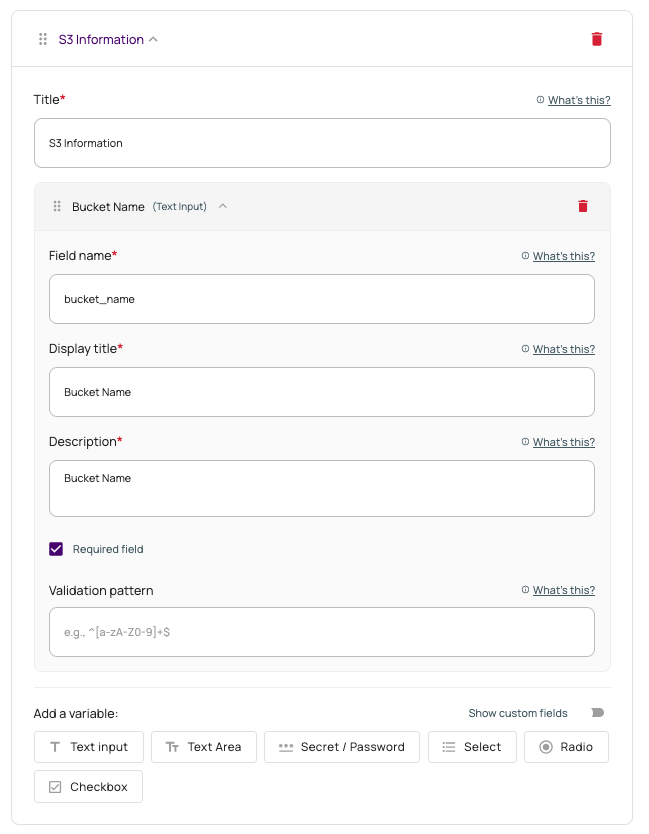
Step 2: S3 Bucket Information
Creating an AWS EC2 Instance Template
Follow this example to create a simple AWS EC2 instance. Venue.sh will take variables defined in your template steps and replace your template files with the actual values when used.
.
├── providers.tf
├── main.tf
├── variables.tf
├── docs
│   └── index.md
terraform {
  required_providers {
    aws = {
      source  = "hashicorp/aws"
      version = "~> 6.0"
    }
  }
}

provider "aws" {
  region = var.region

  default_tags {
    tags = {
      "BusinessUnit"  = "purplehotels-devops"
      "Department"    = "product-${{ values.environment }}"
      "Team"          = "purplehotels-devops"
      "Stage"    = "${{ values.environment }}"
      "Support:Email" = "support@purplehotels.com"
      "Support:Slack" = "purplehotels:support"
      "Support:Url"   = "https://purplehotels.atlassian.net/jira/servicedesk/projects/PH/queues/custom/4"
    }
  }
}
resource "aws_instance" "${{ values.instance_name }}" {
  ami           = "resolve:ssm:/aws/service/ami-amazon-linux-latest/al2023-ami-kernel-default-x86_64"
  instance_type = "${{ values.instance_type }}"
  subnet_id     = "${{ values.subnet_id }}"
  key_name      = "${{ values.key_name }}"

  vpc_security_group_ids = [
    "${{ values.security_group_id }}"
  ]

  root_block_device {
    volume_size           = ${{ values.root_volume_size }}
    volume_type           = "${{ values.root_volume_type }}"
    encrypted             = true
    delete_on_termination = true
  }

  metadata_options {
    http_tokens   = "required"
    http_endpoint = "enabled"
  }
}
variable "region" {
  type    = string
  default = "${{ values.region }}"
}

variable "instance_type" {
  type        = string
  description = "EC2 instance type"
  default     = "${{ values.instance_type }}"
}

variable "root_volume_size" {
  type        = number
  description = "Root volume size in GB"
  default     = ${{ values.root_volume_size }}
}

variable "root_volume_type" {
  type        = string
  description = "Root volume type (gp3, gp2, io1, etc.)"
  default     = "${{ values.root_volume_type }}"
}
# ${{ values.instance_name }} (Terraform AWS EC2)

## Values

- name: ${{ values.instance_name }}
- region: ${{ values.region }}
- environment: ${{ values.environment }}
- instance_type: ${{ values.instance_type }}
- subnet_id: ${{ values.subnet_id }}
- security_group_id: ${{ values.security_group_id }}
- key_name: ${{ values.key_name }}
- root_volume_size: ${{ values.root_volume_size }}
- root_volume_type: ${{ values.root_volume_type }}
When creating a template, each ${{ values.variable }} that you define in your files must also be defined in the variables step.
In the following example, we split the variables into two steps. While you can define your variables however you desire, we recommend splitting them into multiple steps.
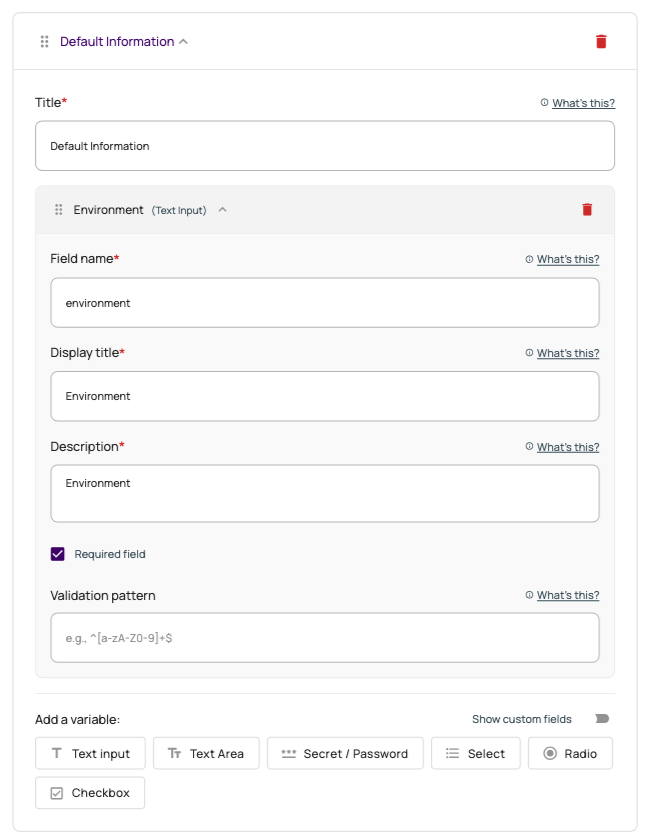
Step 1: Default Information
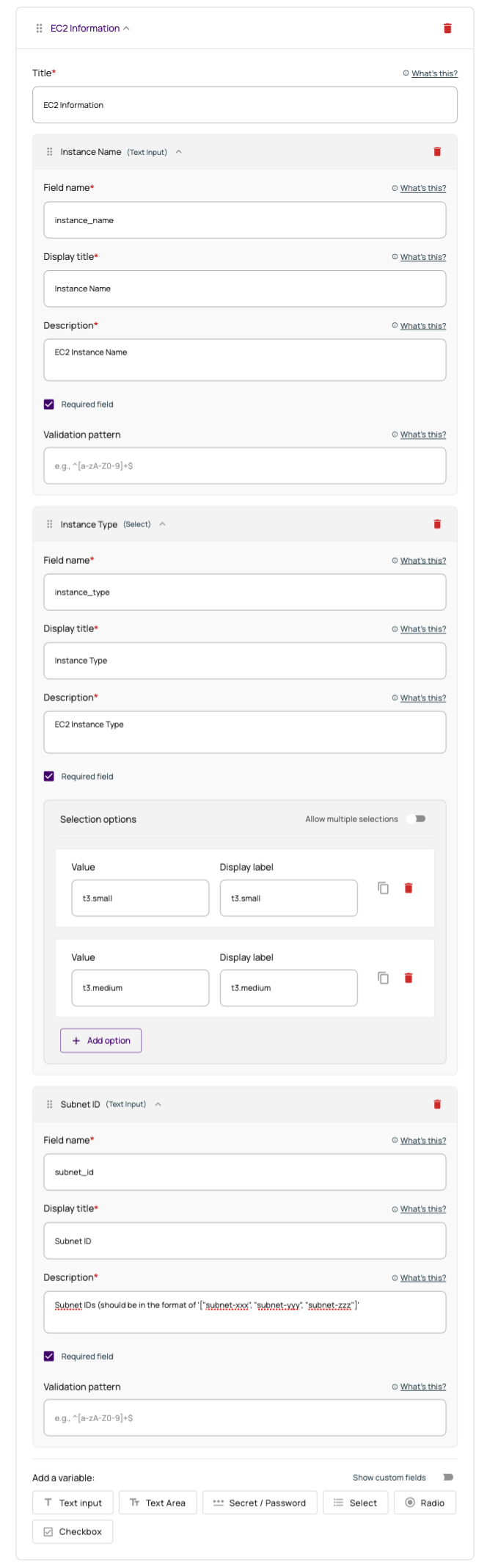
Step 2: EC2 Instance Information