Scorecards
Scorecards is a powerful validation framework in Venue.sh that ensures your entities and repositories meet defined standards. It uses customizable rules to validate them in real time and provides clear pass/fail metrics to help you track compliance and identify areas that need attention.
A scorecard rule targets one of two things:
- Catalog entities - Backstage entities (Components, APIs, and more), checked against their metadata, specifications, and annotations.
- Repository content - the actual files in a repository, checked for existence and, optionally, content.
Venue.sh comes with four pre-installed golden catalog rules, maintained by the Venue.sh team, to ensure consistent quality standards.
Benefits
Scorecards provide many advantages for your development workflow, including:
- Quality assurance by ensuring all entities meet required standards,
- Integration validation by verifying proper tool configurations,
- Compliance monitoring by tracking validation statuses in real-time,
- Standardization by maintaining consistency across your catalog and repositories, and
- Clear metrics by easily identifying areas that need attention.
Golden Rules
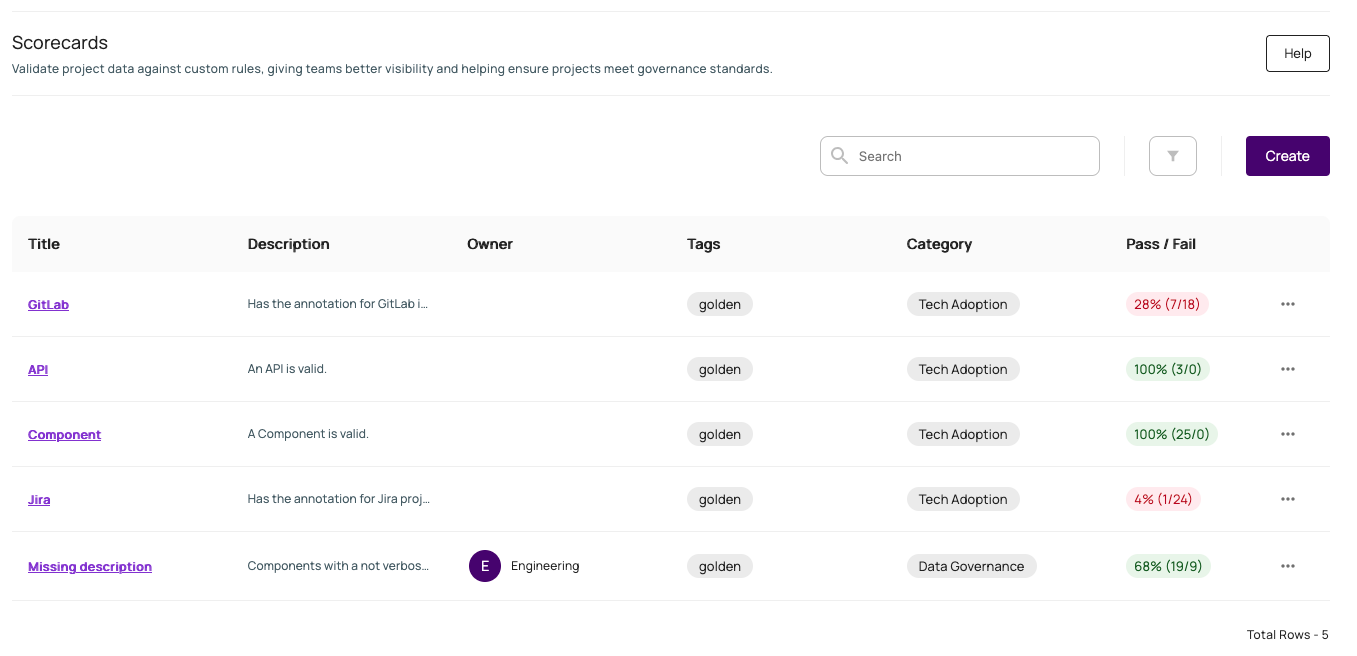
The following rules are configured out of the box and ready to use in your Venue.sh instance:
-
API Rule - Validates API entities by ensuring they have all required metadata and specifications. This rule checks for essential fields, like Name, Type, Lifecycle, Owner, and Definition.
-
Component Rule - Ensures component entities have complete metadata and specifications. This rule validates critical fields, including Name, Type, Lifecycle, and Owner.
-
GitLab Rule - Validates GitLab integration settings by checking for required annotations. This rule ensures proper GitLab instance and project slug configurations.
-
Jira Rule - Verifies Jira integration settings through annotation validation. This rule checks for proper Jira project key configuration.
Here's an example of the golden rules and the feedback they provide:
Repository Content Rules
In addition to catalog entities, a rule can target the files inside a repository, for example "does package.json exist and declare React 19 or newer" or "does every repository have unit tests." A repository content rule can target an explicit list of repositories, or repositories linked to specific catalog entities, and requires that repository to have at least one completed content ingestion before it can be evaluated.
There are three ways to build a repository content rule, from least to most manual:
- Category templates - One-click starting points for common checks (build/test/deploy, tech adoption, security, code quality, and observability).
- Assisted generation - Describe your goal in plain language and an AI assistant proposes match files and content check expressions based on the target repository's actual content, which you can review and edit before saving. Generated expressions follow the shared operators and repository field rules in Expressions.
- Manual - Write the match files and content check expressions yourself using the repository content expression language (see Expressions).
Every repository content rule can be previewed before saving, showing exactly which files matched and whether each targeted repository passes, fails, or couldn't be evaluated (for example, if that repository has no completed ingestion yet). Preview results are shown per tier.
Writing Rules
When you create or edit a rule, Venue.sh groups fields into three sections: Rule metadata, Target type, and Rule parameters.
Rule metadata
Every rule requires:
- Title - A unique, descriptive identifier for the rule
- Owner - Team responsible for maintenance
- Tags - Keywords for filtering in the scorecard list
- Category - Organizational grouping (for example, Security or Build, Test, and Deploy)
Description is optional but useful for documenting what the rule checks.
Target type
Choose whether the rule validates catalog entities or repository content.
Repository content rules also require Target repositories. Select specific repositories or All. Only repositories with at least one completed content ingestion can be evaluated.
Rule parameters
Both target types use the expression language documented in Expressions.
| Target type | Selection (required) | Validation |
|---|---|---|
| Catalog entities | Selector | Criteria (required) |
| Repository content | Match files | Content check (optional) |
- Selector / Match files - What the rule applies to (an entity kind, file paths, or globs)
- Criteria / Content check - Conditions the selection must meet. Leave Content check empty for an existence-only repository rule.
For repository content rules, you can start from a category template, use assisted generation, or write Match files and Content check manually.
For catalog entity rules, use the visual query builder in Rule parameters, or toggle Advanced to write Selector and Criteria expressions manually. If you edit a rule in Advanced mode, you cannot switch back to the visual builder.
Detailed information about rule syntax and writing expressions for both catalog entities and repository content can be found on the Expressions page.